The photo you posted knows where you live
You list something on Marketplace and photograph it on your kitchen table. A buyer saves the picture, opens the metadata, and reads off the coordinates of your kitchen — accurate to within a few metres — before either of you has sent a message.
Nothing about that requires skill or special software. The coordinates are sitting in the file, written there by your phone, in a documented public format that any browser or free viewer can read in about two seconds. The photo looks completely ordinary. That is the entire problem: there is no visible sign that any of it is there.
What's actually inside a typical phone photo
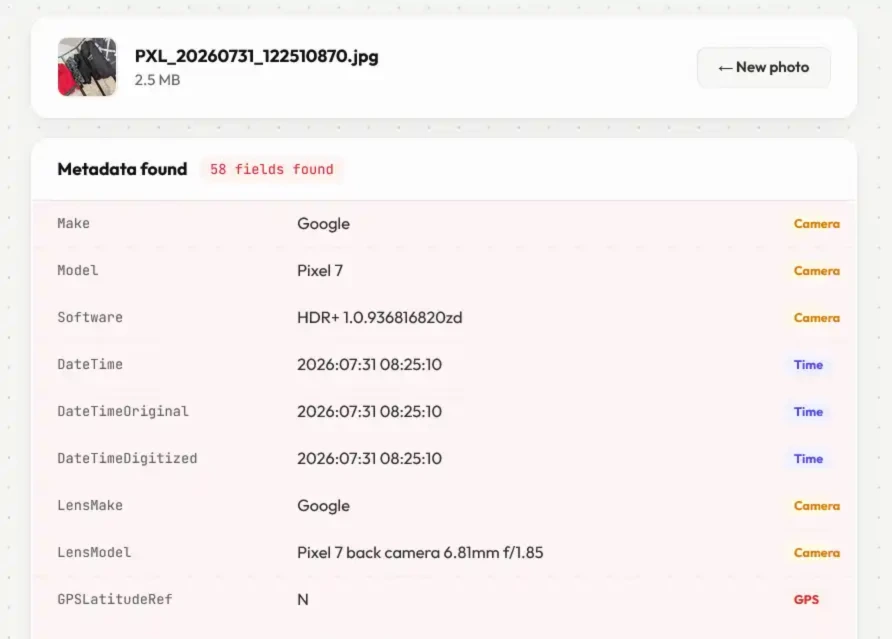
Drop any photo into the tool above and you will see its real contents. A representative set looks like this:
| Field | Example | Risk |
|---|---|---|
| GPS latitude / longitude | 45.5017° N, 73.5673° W |
HIGH |
| GPS altitude | 28.4 m |
HIGH |
| Date & time taken | 2026:03:15 08:42:11 |
MED |
| Camera make & model | Apple iPhone 15 Pro |
MED |
| Lens serial number | 0x00D93F… |
MED |
| Software version | iOS 18.3.1 |
LOW |
| Exposure, ISO, aperture | 1/120s · f/1.8 · ISO 64 |
LOW |
The GPS fields are the obvious danger. The quieter ones matter too, and they compound. Timestamps across a set of photos map out a routine — when you are at home, when you are not. The lens serial number is effectively a device fingerprint: post under two unrelated accounts and the same serial links them. Many photos also embed a small preview thumbnail, which in older software occasionally survived cropping and showed the uncropped original.
When it's worth doing
Not every photo needs this. These are the cases where it genuinely counts:
- Selling things online — the item was almost certainly photographed at your address
- Posting regularly from one place — individually harmless, collectively a map of your life
- Photos of children — home and school coordinates ride along in the file
- Protest and event photos — location plus timestamp places specific people somewhere specific
- Rental and property listings — confirms an exact address you may have deliberately kept vague
- Anything sent anonymously — device fingerprinting is how anonymous sources stop being anonymous
Don't assume the platform did it for you
The large social networks generally do strip metadata, mostly as a side effect of re-encoding every upload rather than out of concern for you. Plenty of other routes don't: direct file transfers, cloud storage links, email attachments, and various forums and marketplace apps frequently hand over the original file byte for byte.
The catch is that this behaviour changes quietly, differs between a platform's app and its website, and often differs again depending on whether the recipient views the photo or downloads it. Any list of "platforms that strip EXIF" is out of date the moment it's published.
So don't take anyone's word for it — including this page. Test the specific route you care about, once:
-
1Post a photo you know has GPS in it Check it in the tool above first so you know what should be there.
-
2Download it back from the platform Save it the way a stranger would — the downloaded file is what actually matters, not what you uploaded.
-
3Drop the downloaded copy into this tool Whatever it lists is what everyone who saves that photo can read.
Two minutes, and afterwards you know rather than assume. Worth repeating occasionally for anywhere you post often.
How the stripping works — and what it costs
The clean copy isn't produced by deleting tags out of your file. The image is drawn onto a blank HTML canvas and exported fresh. The canvas holds nothing but pixels — it has no concept of EXIF — so the file that comes out was simply never given any metadata to carry. There is no residue and nothing to recover.
That approach is clean, but it isn't free, and most tools won't tell you this:
- JPGs are re-encoded at quality 95. One extra generation of JPEG compression, invisible in normal viewing — but it is not bit-identical, so work from your original rather than stripping the same file repeatedly.
- PNGs come out lossless. Identical pixels, no compression cost at all.
- WEBP and TIFF are exported as PNG, since that's the safe lossless target. Expect a noticeably larger file.
- The ICC colour profile goes too. Irrelevant for ordinary sRGB photos, worth knowing if you handle wide-gamut images for print.
- File size can move either way. Dropping metadata and the embedded thumbnail saves space; re-encoding a heavily compressed JPG at quality 95 can add more than it saves.
Your original file is never modified — the clean version downloads alongside it with _clean added to the name. If the point was to get rid of the metadata for good, remember to deal with the original afterwards.
Turn it off at the source too
Stripping is the fix for photos you already have. To stop new ones recording location:
iPhone: Settings › Privacy & Security › Location Services › Camera › Never. There's also a per-share control that's easy to miss — in the share sheet, tap Options at the top and switch Location off before sending.
Android: open the camera app's settings and turn off "Save location" or "Store location" — the wording varies by manufacturer.
Neither replaces stripping. Camera settings do nothing for the thousands of photos already in your library, they don't touch the camera fields or the device serial, and settings get switched back on by app updates and new phones without telling you. Treat the camera setting as a baseline and the strip as the thing you actually rely on.
What this doesn't hide
Metadata is only the invisible half. The pixels themselves give away plenty: a house number, a street sign, a distinctive view from a window, a reflection in a mirror or a pair of glasses, a screen with something readable on it. Nothing in a metadata strip touches any of that, and it's often easier to spot than a coordinate pair.
Faces are the other half. If there are people in the shot who didn't agree to be posted, run it through the Face Blur tool as well — blur the faces first, then strip the result, so the file you end up sharing is clean in both senses.