When you actually need to blur a face
A protest crowd. A street scene from a trip. Someone else's kids at a school concert. A screenshot of a group call you want to post about. A photo of an accident you're reporting. In each case the photo is worth sharing and one person in it never agreed to be published.
Blurring the face is the obvious fix. Finding a tool that does it without asking you to upload the photo first is the hard part — and if the photo is sensitive enough to need blurring, handing the unblurred original to an unknown server is a strange way to start. This tool does the whole job on your own machine.
How the detection works
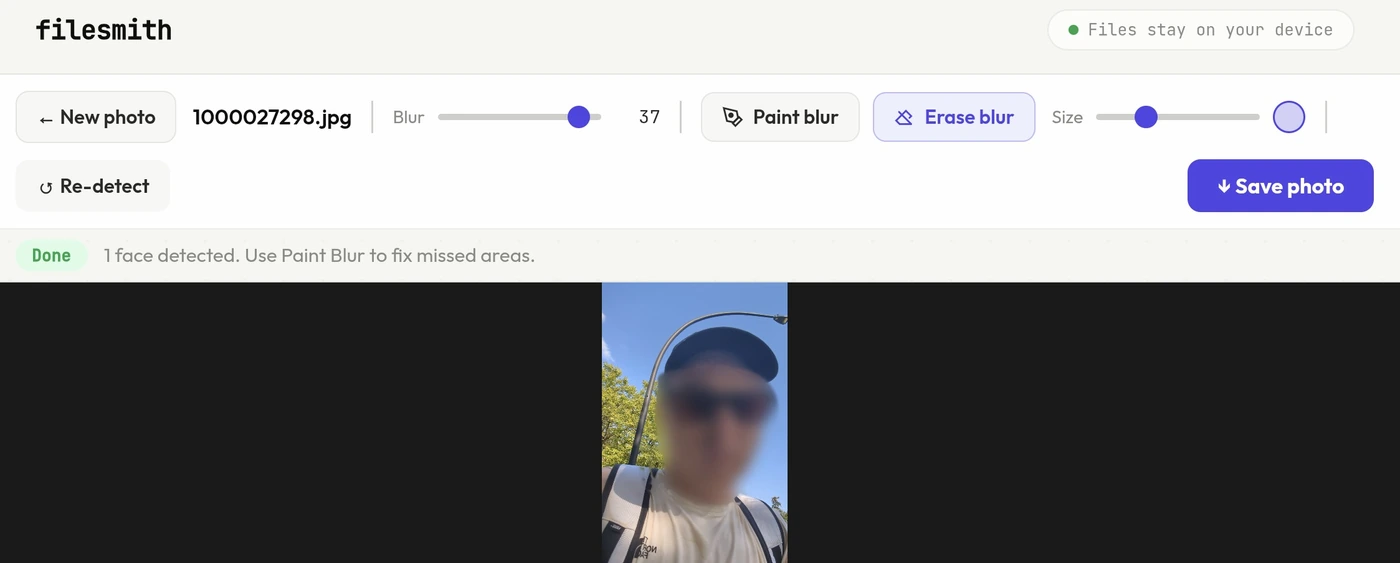
Face detection runs through face-api.js, using its tinyFaceDetector model. The model file loads once from a CDN into your browser tab, and from that point everything happens locally — your photo is read into a canvas, analysed on your own CPU, and blurred in place. No image data is sent anywhere.
The model is quick and dependable on faces that look roughly toward the camera. It gets less reliable as conditions get further from that, and it will regularly miss faces that are:
- Turned more than about 45° to the side
- Small in the frame — a crowd in the background, for instance
- Partly hidden behind hats, sunglasses, hands or masks
- Dimly lit, backlit, or low in contrast against the background
This is normal for a lightweight in-browser detector, and it's the reason the manual brush exists. Treat the automatic pass as a first draft that saves you time, not as a guarantee. Always check the result yourself before you save.
Using the tool
-
1Drop your photo Any JPG, PNG or WEBP. Nothing is uploaded.
-
2Let the automatic pass run The model loads, finds what it can, and blurs every face it detects straight away.
-
3Set the blur strength The slider re-renders live, so you can judge the result as you drag it.
-
4Paint over anything missed Switch to Paint blur. The brush has a soft edge, so it blends instead of leaving a hard rectangle.
-
5Erase where you went too far Erase blur lifts it back off. Re-detect starts the automatic pass over.
-
6Save Downloads in the format you started with. Your original file is never modified.
For a crowd, run the automatic pass first, then take a large brush at a low blur setting and sweep the background in one pass. The brush goes up to 120px, so a distant crowd takes a few seconds rather than a few minutes.
How much blur is enough?
This is the part most tools skip, and it's the part that decides whether the blur actually works. Blur strength has to scale with how large the face is in the image. A radius of 18 obliterates a face that's 120 pixels wide and barely softens one that's 500 pixels wide — same setting, completely different outcome.
The working rule: use a radius of roughly 10% of the face's width in pixels, and never go below 12.
| Face width in the photo | Typical case | Blur setting |
|---|---|---|
| ~80 px | Someone in the background of a wide shot | 12–14 |
| ~150 px | A person mid-frame in a group photo | 15–18 |
| ~300 px | Head-and-shoulders portrait | 28–32 |
| 400 px and up | Tight close-up, or a large photo | 40 |
One check that takes five seconds and is worth doing every time: open the saved file and view it at 100%. Phone screens and shrunken previews flatter a weak blur — anyone downloading the full-size image sees far more than you did. If you can still make out the shape of the eyes and mouth at full size, go higher and save again.
Blur, pixelate, or a black box?
All three hide a face on a casual glance. They are not equally strong.
A black box is the most secure, because it doesn't obscure the pixels — it replaces them. There's nothing underneath to work back to. It also looks blunt, which is why most people avoid it.
Heavy blur is close behind. A large-radius Gaussian blur throws away the fine detail rather than rearranging it. Nothing is left to reconstruct from. AI tools that claim to "enhance" or "unblur" a face are inventing a plausible face from a model, not recovering the real one — the information is genuinely gone.
Pixelation is the weakest of the three, and it's the one people reach for most. Each mosaic block stores the average colour of the region it covers, in a fixed, regular grid. That structure is predictable, which gives matching and reconstruction methods a foothold that a smooth blur doesn't offer. If you've used a light mosaic on something sensitive in the past, treat it as obscured rather than removed.
The other reason to prefer blur: it degrades gracefully. A blur that's slightly too weak still hides a lot. Pixelation at too large a block size looks obviously censored while sometimes revealing more than you'd assume.
A face isn't the only thing that identifies someone
Blurring faces and stopping there is the most common mistake. Before you post, look over the rest of the frame for:
- Name badges, lanyards and ID cards — often legible once someone zooms in
- License plates and vehicle details
- House numbers, street signs and shopfronts that pin down a location
- Distinctive tattoos, jewellery or hair, which identify a person as reliably as a face to anyone who knows them
- Screens and monitors in the background, including anything reflected in glasses, windows or mirrors
- Documents, whiteboards and sticky notes caught in the shot
The brush works on all of these — nothing about it is face-specific. Paint over anything you don't want published.
Then there's the part that isn't visible at all. Blurring changes pixels; it doesn't touch metadata. A photo can have every face perfectly blurred and still carry the GPS coordinates where it was taken, the timestamp, and your camera's serial number, all embedded in the file. If you're posting publicly, run the blurred file through the EXIF Stripper before it goes anywhere.
Worth knowing too: in the EU and UK, a photograph in which someone is identifiable counts as their personal data under GDPR, and several other jurisdictions take a similar line. Rules differ by country and by context, and none of this is legal advice — but "I blurred the faces" is a materially stronger position than not having done so.