FLAC to MP3 Converter
FLAC is lossless but large and not supported everywhere. Convert to MP3 for a small, universally compatible audio file.
Why convert FLAC to MP3?
FLAC is the gold standard for lossless audio — every bit of the original recording is preserved exactly, making it ideal for archival and audiophile listening. The downside is size: a typical album in FLAC is 250–400 MB, often 5 to 10 times larger than the same album in MP3.
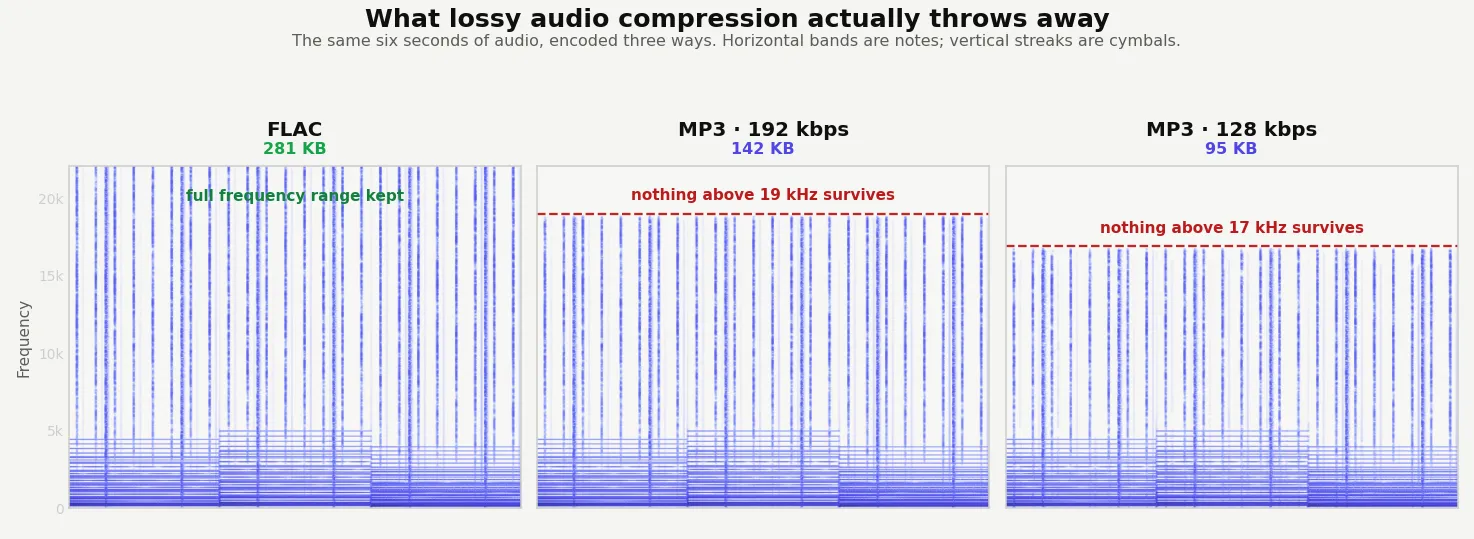
MP3 has been the universal audio format since the late 1990s. It's lossy (some audio data is discarded during compression), but at 192 kbps or higher the difference from the lossless original is inaudible to most listeners on most equipment. Every device, every player, every car stereo, and every streaming service supports MP3.
Convert FLAC to MP3 when you want to fit more music on a phone, share files easily, or play tracks in older equipment that doesn't support FLAC. Keep the original FLAC files as your archive — you can always re-encode in the future.
About FLAC
FLAC (Free Lossless Audio Codec) is an open-source compressed audio format. It reduces file size by roughly 50% compared to uncompressed WAV without losing any audio data — decoding a FLAC file gives you a perfect reproduction of the original. It's the format of choice for music archives and audiophile downloads.
About MP3
MP3 (MPEG-1 Audio Layer III) is a lossy compressed format that's been the universal standard for digital audio since the 1990s. It uses psychoacoustic modeling to discard sound information humans can't easily hear, achieving very small files at acceptable quality.
Quality and file size
FLAC is lossless and MP3 is lossy, so there is a real quality loss in this conversion — but at standard MP3 bitrates of 192 kbps or 320 kbps, the difference is inaudible to most listeners. If you're converting for portable use, sharing, or general listening, the size savings (often 80% or more) are worth it.
FLAC is lossless but not small. On this sample it held the same audio as the WAV in 934 KB; MP3 at 320 kbps brought that to 539 KB, and 192 kbps to 324 KB.
How these figures were measured →
Filesmith runs entirely in your browser using WebAssembly. Files are never uploaded to any server — conversion happens locally on your device, instantly and privately.