WAV to MP3 Converter
WAV files are huge. Convert to MP3 for a much smaller file that plays everywhere — perfect for sharing, streaming, and everyday listening.
Why convert WAV to MP3?
WAV is uncompressed audio — every sample of sound is stored exactly as recorded. It's the standard format for audio production and editing, but the files are huge: a typical 4-minute song in WAV is around 40 MB. MP3 uses lossy compression to shrink that down to about 4 MB at 128 kbps or 10 MB at 320 kbps, with audio quality that's indistinguishable from the original WAV at higher bitrates.
Converting WAV to MP3 is the right move when you need to share, store, or play audio files in any context that doesn't require lossless quality — phones, car stereos, music players, web uploads, podcasts.
If you're keeping the WAV for editing or as an archival master, you can always re-encode to MP3 later, so there's no harm in this conversion.
About WAV
WAV (Waveform Audio File Format) is an uncompressed audio format developed by Microsoft and IBM in 1991. It stores raw audio samples with no compression, producing perfect quality and very large files. WAV is the standard format for audio editing and production.
About MP3
MP3 (MPEG-1 Audio Layer III) is the universal compressed audio format. It uses lossy compression to dramatically reduce file size while keeping audible quality high. MP3 is supported by every device and is the standard for portable music.
WAV vs MP3 at a glance
| WAV | MP3 | |
|---|---|---|
| Compression | None — raw audio | Lossy |
| Typical size | About 10 MB per minute in stereo | About 1 MB per minute at 128 kbps |
| Quality | Bit-perfect | Very close at higher bitrates; audible below about 128 kbps |
| Metadata | Limited | Title, artist, album, artwork |
| Support | Universal | Universal |
| Best for | Recording, editing, mastering | Listening, sharing, storing |
When converting is the right call
- You’ve finished recording or editing and just need something to listen to.
- A file is too large to email, upload or fit on a phone.
- You want artist and album tags, which WAV barely supports.
- You’re sharing a voice memo, podcast or demo where absolute fidelity isn’t the point.
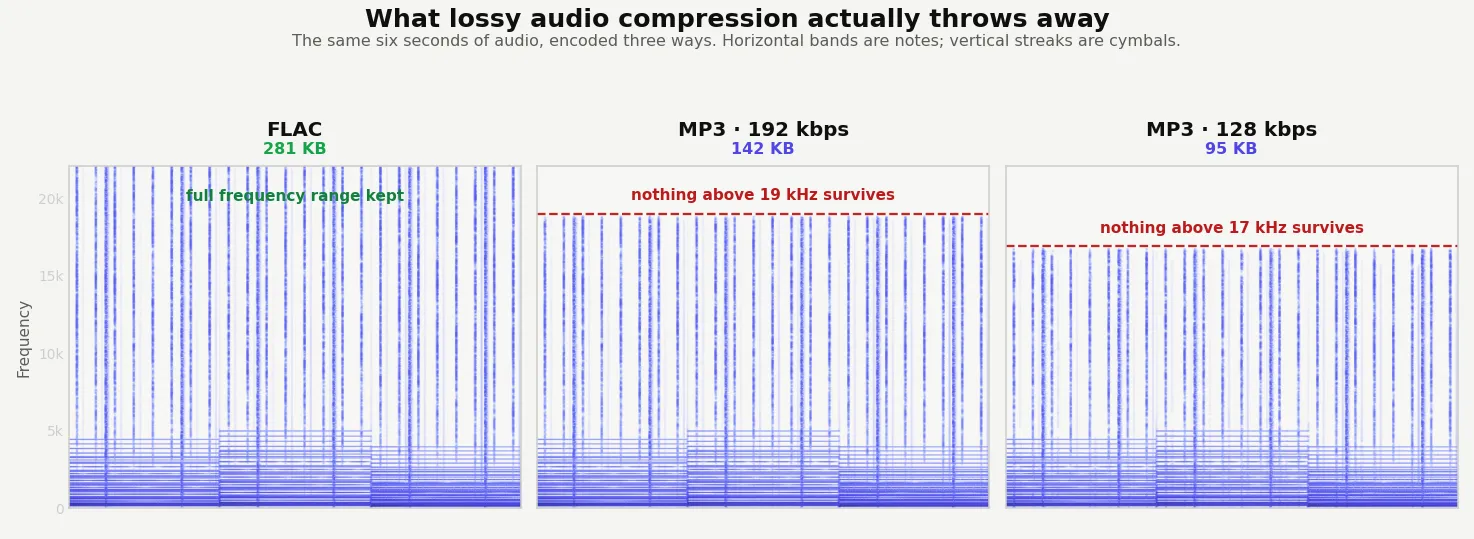
MP3 works by discarding audio it judges you are least likely to hear, and that decision cannot be reversed. Converting back to WAV later gives you a much larger file containing exactly the same reduced audio — a 324 KB MP3 became a 2,576 KB WAV here and sounded identical. Keep the WAV if it’s a master. If you want a smaller file with nothing lost at all, FLAC is the lossless middle ground.
Quality and file size
MP3 is lossy, so technically there's a quality loss compared to the WAV original. At 192 kbps or higher (and certainly at 320 kbps), the difference is inaudible to virtually all listeners on virtually all equipment. The output MP3 will typically be about 10% the size of the original WAV.
WAV stores audio completely uncompressed, so its size is pure arithmetic: 48 kHz, 16-bit stereo works out at 11.5 MB per minute regardless of what the audio contains. MP3 changes that dramatically.
How these figures were measured →
Filesmith runs entirely in your browser using WebAssembly. Files are never uploaded to any server — conversion happens locally on your device, instantly and privately.