M4A to MP3 Converter
M4A files from Apple devices don't always play in non-Apple apps. Convert to MP3 for maximum compatibility across every platform and player.
Why convert M4A to MP3?
M4A is the audio format Apple uses for music — files purchased from iTunes, voice memos from iPhones, and audio extracted from Apple's video formats are usually M4A. It typically contains AAC audio, which is technically more efficient than MP3 at the same bitrate. The catch is compatibility: some older devices, certain car stereos, basic media players, and older audio editors don't support M4A.
MP3 is the universal audio format — it works on literally everything. If you've got M4A files that won't play in your car, on an old MP3 player, or in an audio editing program, converting to MP3 solves the problem instantly.
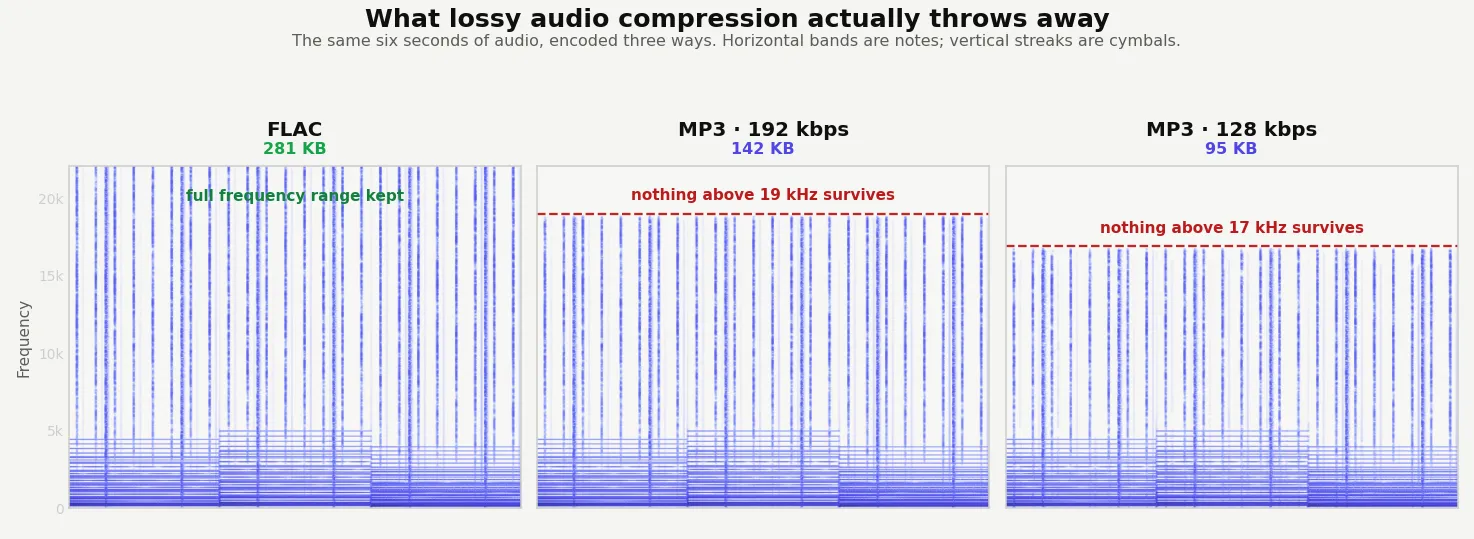
There's a small quality loss in this conversion since you're going from one lossy format to another, but at decent bitrates the difference is inaudible.
About M4A
M4A (MPEG-4 Audio) is Apple's preferred audio container. It usually contains AAC-encoded audio, which is more efficient than MP3 — meaning a smaller file at the same audible quality. M4A files come from iTunes, Apple Music downloads, iPhone voice memos, and audio extracted from MP4 video files.
About MP3
MP3 (MPEG-1 Audio Layer III) is the universal compressed audio format. It's been the standard since the late 1990s and is supported by every device, every player, every car stereo, and every audio platform on the planet.
M4A vs MP3 at a glance
| M4A | MP3 | |
|---|---|---|
| Codec | AAC, in an MP4 container | MP3 |
| Efficiency | Better at the same bitrate | Older, slightly less efficient |
| Typical source | iPhone voice memos, Apple Music, YouTube audio | Almost everything else |
| Support | Excellent on Apple, good elsewhere | Universal, including old hardware |
| Metadata | Full tag support | Full tag support |
| Best for | Apple devices and modern players | Car stereos, old players, anything uncertain |
When converting is the right call
- A car stereo, older MP3 player or DJ software won’t read M4A.
- You’re sending audio to someone and don’t know what they’ll play it on.
- Software you need to use accepts MP3 and nothing else.
- You want one consistent format across a mixed library.
M4A is already lossy, so converting to MP3 means compressing audio that has been compressed once already. Use a high bitrate — 256 or 320 kbps — to keep the second pass from being audible. Purely on technical merit AAC is the better codec, so if everything you own plays M4A there is no reason to convert at all. Do it for compatibility, which is the only thing MP3 wins on.
Quality and file size
Both M4A (AAC) and MP3 are lossy formats, so there's a small quality loss from re-encoding. At 192 kbps or higher, this loss is inaudible to virtually all listeners on virtually all equipment. The output MP3 will be slightly larger than the M4A at the same audible quality, since MP3's compression is less efficient than AAC's.
Worth knowing before you start: M4A generally beats MP3 at the same quality, so this conversion usually costs you size. A 325 KB M4A became a 539 KB MP3 at 320 kbps.
How these figures were measured →
Filesmith runs entirely in your browser using WebAssembly. Files are never uploaded to any server — conversion happens locally on your device, instantly and privately.