MP3 to WAV Converter
WAV is uncompressed and lossless — required by some audio editors, DAWs, and professional workflows. Convert MP3 to WAV when software demands it.
Why convert MP3 to WAV?
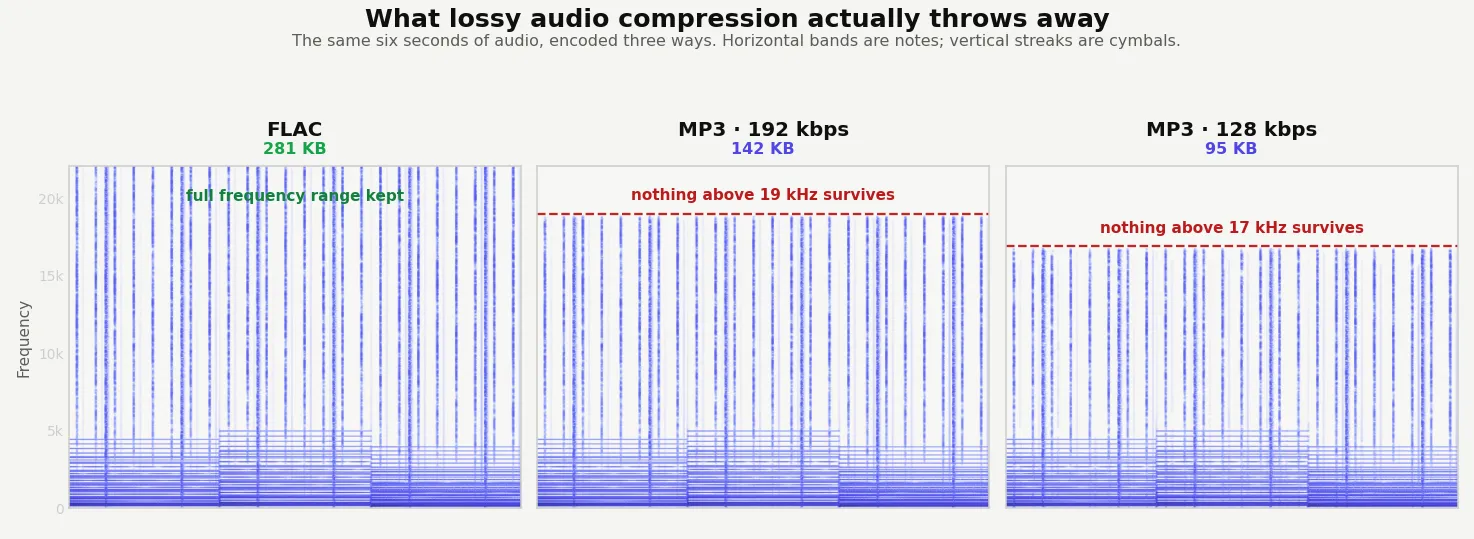
MP3 is a lossy compressed format — convenient for everyday listening but not suitable for audio editing. Once you compress to MP3, some audio data is permanently discarded. WAV is uncompressed: every sample of the audio is stored exactly. That makes WAV the standard format for audio production, sound editing, and any workflow where you need to manipulate audio without further degradation.
Converting MP3 to WAV doesn't recover any of the data the original MP3 lost — that's permanently gone. What it does is give you a clean, uncompressed file you can edit, process, or import into a DAW (Digital Audio Workstation) without worrying about additional compression artifacts.
Expect the WAV file to be about 10 times larger than the source MP3, since uncompressed audio is much bigger than compressed audio.
About MP3
MP3 (MPEG-1 Audio Layer III) is the universal compressed audio format from the 1990s. It uses lossy compression to keep file sizes small while preserving audible quality, and it's supported by every device on the planet.
About WAV
WAV (Waveform Audio File Format) is an uncompressed audio format developed by Microsoft and IBM in 1991. Every sample of the audio is stored exactly as recorded, with no compression. WAV is the standard format for audio editing and music production.
Quality and file size
The WAV will sound exactly the same as the source MP3 — no better, no worse. The conversion preserves the audio data; it doesn't recover quality that was already lost during the original MP3 compression. WAV files are typically 10 times larger than MP3 files because they're uncompressed.
Going the other way costs a lot of space and buys no quality: a 324 KB MP3 became a 2,576 KB WAV, about 8× larger.
How these figures were measured →
Filesmith runs entirely in your browser using WebAssembly. Files are never uploaded to any server — conversion happens locally on your device, instantly and privately.
MP3 vs WAV at a glance
| MP3 | WAV | |
|---|---|---|
| Compression | Lossy — discards audio you're unlikely to notice | None — every sample stored as recorded |
| Size per minute | 0.9 MB at 128 kbps, 2.3 MB at 320 | 10.1 MB at CD quality, 11.0 MB at 48 kHz |
| Compatibility | Plays on everything | Universal, but rarely used for listening |
| Best for | Listening, sharing, storage | Editing, mastering, submission to platforms |
Those WAV figures are arithmetic rather than estimates: uncompressed audio is sample rate × channels × bit depth, so 44,100 Hz in 16-bit stereo is always 10.1 MB per minute no matter what the recording contains.
When you actually need WAV
Most people never do — for listening, MP3 is fine. These are the cases that genuinely call for it:
- Audio editing. DAWs like Audacity, Logic, Reaper and Ableton work best on uncompressed audio, and WAV survives repeated export cycles where MP3 degrades a little each time.
- Distribution platforms. DistroKid, TuneCore and most podcast hosts either require WAV or strongly prefer it, because they re-encode at their end and want a clean source.
- Software that refuses MP3. Some older or specialised tools accept PCM only.
- Archiving a master, though FLAC holds the same audio losslessly in about a third of the space.
Converting MP3 to WAV does not restore quality. The detail the MP3 encoder discarded is gone, and the WAV is simply an uncompressed copy of what remains — same sound, roughly eight times the size. Convert because software demands PCM input, never to improve fidelity.