MP4 to MP3 Converter
Extract just the audio from any MP4 video file. Great for pulling music, podcasts, lectures, or voice recordings out of video.
Why convert MP4 to MP3?
Sometimes you only want the audio from a video file. Maybe you've recorded a podcast, lecture, or interview as video and want a smaller audio-only version. Maybe you want to save a song from a music video for personal listening. Maybe you're extracting voice memos. Whatever the reason, converting MP4 to MP3 strips out the video and gives you just the audio in the universal MP3 format.
The output is a standard MP3 file that plays on every device, in every music app, and works in every audio editing tool. File size drops dramatically — a 5-minute MP4 video that's 50 MB might become a 5 MB MP3.
MP3 is the right choice when you need universal compatibility and small file size. For lossless extraction, WAV or FLAC are better options.
About MP4
MP4 is the universal video container. It contains a video stream and one or more audio streams (usually AAC), which is what we extract during this conversion.
About MP3
MP3 (MPEG-1 Audio Layer III) is the universal compressed audio format. It's supported by every device and is the standard for portable music.
Quality and file size
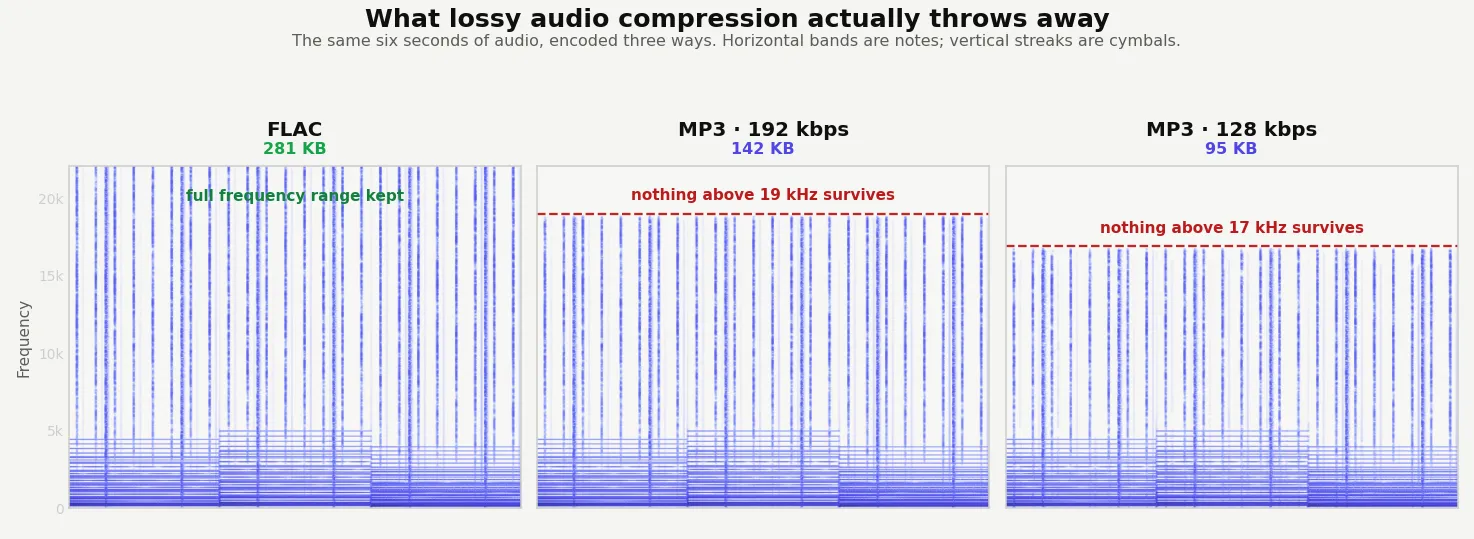
There's a small quality loss because the original MP4 contained AAC audio, and we're re-encoding it to MP3 (both are lossy formats). At 192 kbps or higher MP3 bitrate, this loss is inaudible to virtually all listeners. The audio is otherwise preserved exactly as it was in the video — same length, same sample rate, same channels.
Discarding the video is the whole saving. A 19.9 MB clip became a 315 KB MP3 — 98% smaller, with the audio untouched apart from one re-encode.
How these figures were measured →
Filesmith runs entirely in your browser using WebAssembly. Files are never uploaded to any server — conversion happens locally on your device, instantly and privately.
Why people pull the audio out
More situations than you'd guess: a voice memo that got recorded as video, a lecture or interview captured on a phone, a concert clip where only the music matters, a podcast filmed rather than recorded, or simply wanting something you can listen to with the screen off.
Which format to extract to
| Format | Why you'd pick it |
|---|---|
| MP3 | Plays on absolutely everything. The right default for listening and sharing. |
| M4A / AAC | Better quality than MP3 at the same size, and usually what was already inside the video. |
| WAV | Uncompressed, for editing. Large — around 10 MB a minute. |
| FLAC | Lossless but compressed, roughly a third the size of WAV. |
For most people MP3 at 192 kbps or higher is the right answer: small, universal, and indistinguishable from the source for anything short of professional work.
The audio inside an MP4 is usually AAC, so producing an MP3 means re-encoding one lossy format into another — a second generation of compression. It is inaudible at a sensible bitrate, but it isn't free. If you want the audio exactly as it sits in the video with no re-encoding at all, extract to M4A instead and keep the original AAC stream.